
Written by Kristi Divin / Colorado Technical University – Online
Course – CS347 / Instructor Cheryl Frederick
Table of Contents
Cover – 1
Table of Contents – 2
Project Outline – 2
Phase 1 – 3
1. User Interface Functional & Technical Requirements
2. User Interface Human Interaction Requirements
Phase 2 – 5
1. User Interface Design Prototypes
Phase 3 – 8
1. Usability Test Questionnaire
2. Usability Test Instruction Guide
Phase 4 – 12
1. Usability Test Results
2. Itemization of Changes
Phase 5 – 12
1. Final User Interface Design
Project Introduction
Within the introduction of this research project, you will find a cover page with the student and course information, as well as a page that contains the table of contents in a simplified version, and finally a project outline that goes into more detail on what will take place with progression of the project!
Project Phases
Phase 1
This phase will contain the functional and technical requirements that must be met with the development of a web application such as processors, memory, and display capabilities. Requirements for human interaction will also be discussed!
Phase 2
Physical sketches, diagrams, and paper interfaces will be explored when deciding which prototype to utilize for the research project.
Phase 3
In this phase a questionnaire will be launched along with an instruction guide on which areas that need to be tested within the web application’s development and why.
Phase 4
Phase 4 will show the post – test results once the areas discussed in phase 3 have all made it past the testing phase successfully.
Final Design
The most important phase in this project is phase 5: the final user interface design. This phase will be the output of everything learned within this course’s progression. Phase 5 will also contain a references page that provides all sources that have been utilized.
Functional Requirements
It was not hard to find list after list of hundreds of different functional requirements that should be met before the development of an application officially begins. However, there is one list that caught my attention quickly simply because it did more than just list the functional requirements, it put specification details under each one which made it easier for me to understand the purposes and benefits. This list was written on a programming engineer’s blog and published by Altexsoft.
The first functional requirement listed is a document or documents that specify the software requirements needed by the application in question. This step is important because, “The SRS contains descriptions of functions and capabilities that the product must provide.” (Altexsoft, 2021) While it is not recommended that this be done for the entire application at once, it is important that it is done before the building process of the application has begun.
Use cases being applied is the second functional requirement that will need to be met before the application is finalized. There are three important elements that should be found in each use case utilized: actors, systems, and goals. Actors can be considered users or buyers of the finalized application. Systems are defined by the functional requirements. Finally, goals are the intended purposes of interaction between buyer and system or consumer and producer.
User stories is the third functional requirement, and according to Altexsoft, “A user story is a documented description of a software feature seen from the end-user perspective. The user story describes what exactly the user wants the system to do.” (Altexsoft, 2021)
Fourth on the list of functional requirements is decomposition or work breakdown structures, also known as WBS. WBS is a document, normally visual, that is designed to how the whole of an application breaks down into smaller pieces, in other words it is the same as looking at the blueprint to a house being built.
Number five, and final, on the list are the design documents and prototypes. The three main design formats that often blur together are wireframes, mockups, and design prototypes. These formats usually contain visual aids and, “Allow for some interface interactions, like scrolling, clicking on links, or filling in forms.” (Altexsoft, 2021)
Technical Requirements
When a developer is considering the technical requirements for an application there are certain questions they need to ask themselves prior to development. During my research, I came across a technical blog known as The App Solutions that does a very good job describing this process. The snippet of text below was pulled off the blog mentioned simply because I did not feel I could reword it better on my own!
After you answer these questions for yourself, the next step is writing the technical requirements documentation which allows the developer to structure information and build a visual of the application, analyze competitors, brainstorm the ideal application, and reduce costs overall.
A few decent reasons for the creation of technical specification include:
- Inclusion of all technicalities.
- Flexibility for future upgrades and updates.
- Boosts the value of the application.
- Helps with maintenance.
- Allows for future reuse.
Human Interaction Requirements
At first glance, it is easy to see how human interaction requirements for an application could be overwhelming. However, there is a lot less to it then I believed initially. When considering the requirements for an interactive application there are 3 basic factions to consider: effectiveness, efficiency, and satisfaction. All these factions fall under the usability category of any application or website, but to specify it further I dug my heels into a blog known as wisdomjobs.com, and here is what it had to say.
- For interaction to be effective, an application must be able to help a user achieve or maximize their goals.
- For interaction to be efficient, an application must be able to efficiently utilize its resources to help a user meet their goals.
- For a user to leave the application satisfied, they must be able to utilize the application with ease.
PHASE 2: PROTOTYPES
While it may have taken a couple days’ worth of brainstorming to figure out exactly how I wanted this application to look, it is safe to say I am happy with the outcome! What you will see as you progress through phase 2 is a series of low – fidelity prototypes followed by a page explaining how they work and what they are for. Please keep in mind, however, that simplicity is key with anything I create, and this application is no different. In fact, it is being built for easy navigation which makes it user – friendly, technically capable, and functionally capable of getting a user where they need to go in a timely manner.
While I do enjoy sketching, especially when it comes to blueprints or anything of the like, I am aware I am not the best at it which is why I decided to graphically design these prototypes using a favorite online editor. It is likely they have a bit more detail than your typical low – fidelity prototype, but it is hard to avoid that when you graphically design anything. With that in mind, look at page 5 for the first page to the location – based application for a fictional company known as Urban Enterprise, that is known for social media advertising and marketing.
Just like a website, a web – based application will have a few different pages, usually a home page, about / transaction page, and a contact / support page. The home page of any application or website can be considered the mission statement or application purpose. In this case, there is a broadly – written message of, “Do not wait another moment! Search for your location and find out if your eligible for digital services by Urban Enterprise!” The home page of this application also contains and interactive banner, and two redirection buttons.

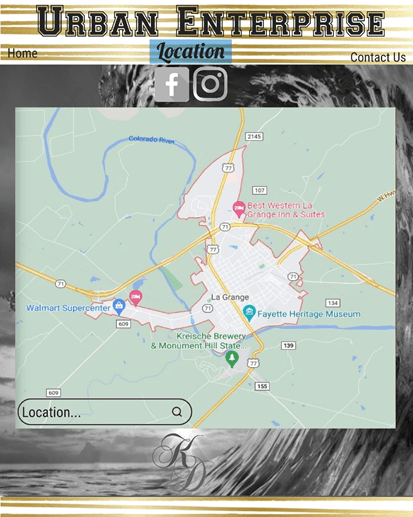
Next, we come to the location page of the application which enables the user to search for their home address, since this company only does business within a certain mileage. Once this search is complete, a message will appear in place of the map, stating whether the user is eligible for services or not.
Normally, any type of application that requires a location search is powered or supported by good maps, android maps, or anything else of the like. In this case, I chose to portray Google Maps because it is an application I trust. To allow this application to work with google maps, there would be a hyperlink or a few lines of coding to allow this transfer of data.
Finally, a minor change between the pages of the application is color theme. Some would wonder why, and the reason is so there is no question in the mind of the user that they have switched pages within the application.
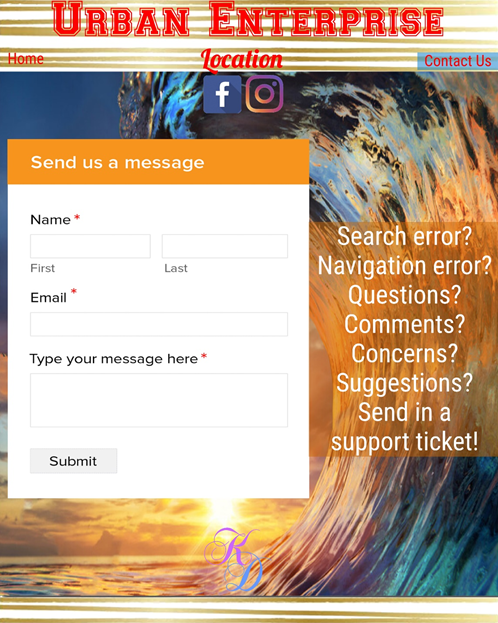
The last of page of this application is both a contact page and a support page. This page allows a user to send in a form to the company, regardless of whether they have an issue with the application or not. Like most forms, this one requires name, email, and message validation. If any of these spaces are left empty, they application would provide an error message in place of the form, and the user would not be allowed to move forward.
Usability test questionnaire & Guide
Ideally, a usability test questionnaire will be your guide, or areas that you want to test depending on the application you are working with, or the company you are working for. When considering the design of a web application for my own business, my goal is to dissect each faction of the application that a designer would find important. Below is a series of different pages with different content including demographics, usability testing questions, function questions, and a comment / concerns page. The detailed guide for each page is directly below it.
The customized page above is a short, but specific questionnaire regarding the demographics needed for a digital design business. This questionnaire would be easy to complete, taking approximately 5- or 6-minutes total. Towards the bottom of the page, you will notice that the last few questions have a set of options below the answer box; these serve as examples in case there may be some confusion on proper words or numbers.
The usability part of this questionnaire is more extensive, but still generalized in hopes of making it easier to understand. Usability is a broad term that covers a large area of application aspects such as error prevention, navigation, appearance, launch times, accuracy, and more.
When considering error prevention for an application, error messages and recovery are two examples that could serve as answers for methods listed on this part of the questionnaire.
Navigation is the process of going from one page to the next, or one function to the next within the application. When answering this question, you will need to think on the ease or difficulty you have experienced when moving from place to place.
Legible fonts and eye – pleasing color themes both fall under the aesthetics of a web application. If these factors flow together smoothly and cannot be considered an eye sore, the user will likely be pleased with the application.
Launch times are exactly what they sound like but can also be called the start time for an application. If the application takes more than 60 seconds to start up, this part of the questionnaire is likely to have a bad rating.
Map accuracy is the piece of the application that utilizes Google GPS to connect the user to the company through the physical location of the user. If the GPS system is not accurate, the company would likely lose a lot of business or even go bankrupt.
Applications can pass or fail at performance for many reasons, but usually what can make or break them, is how user – friendly they are. Part of being user – friendly is being fully functional on a home computer as well as a mobile device. Still, a more important factor is the transition from one device to the next being a smooth one.
The very last line of the usability questionnaire is asking for a percentage on the overall usability of the application. If the result is less than 50%, the application needs a lot more work. If the result is greater than 50%, there may not be much more to work on depending on where the weaknesses are.
The ratings needed for the functionality of the web application are more specific, but easier to determine with the 5 – star rating system. The questions above each set of stars state what needs to be considered when deciding which rate to give each faction presented.
The easiest part of the questionnaire is the very last page, the comments, or concerns section. This page has no instructions that go with it to allow the development team to freelance their last thoughts on the web application before progressing to further development!
Itemization
Based on previous feedback and the results of the usability test, I do not feel as though there are many major changes that need to be made. However, the minor changes will not be over – looked just because they are minor! The following chart describes the planned changes from start to finish, followed by the usability test results.
| Unit 1 | Unit 2 | Unit 3 | Unit 4 |
| Paraphrasing | Prototype Expansion | Rewording Questions | Prototype Borders |
| Functional Expansion |
Whiles this list of changes may seem very basic, there are a lot of steps involved here. While paraphrasing the direct quotes throughout the text, I hope to learn a little more about the sources I have utilized for the research end of the project. Through functional and prototype expansion, my goal is to embed new applications and features within my own. Finally, through some minor tweaking of appearance and text, there is the hope of making the project that much more visually pleasant.
Usability test results
Demographic Form
There do not seem to be any specific changes that need to be made on the demographic form according to the feedback I have received, however a change I am considering is a different font on the page for the sake of making the form a bit easier to read so there is no miscommunication.
Usability Form
While there are no outright yes or no type questions in this form, what may need to happen is lengthening the questions a bit so that yes or no is not an option for an answer.
Functionality Form
The big change I would like to see happen with the last form is an expansion in size! So, instead of just 5 stars it would be more realistic to have 10 stars, in hopes of the ratings being more diverse! Despite minority, I would also like to change the color of the stars to fit the theme a bit better!
The result / goal of my web – based application would be allowing the user to fill out the starting form with their demographics. Based on the information given, they would be approved or denied digital service. The determining factor would be location, and depending on services needed, probably age as well.
Current changes and Future Development
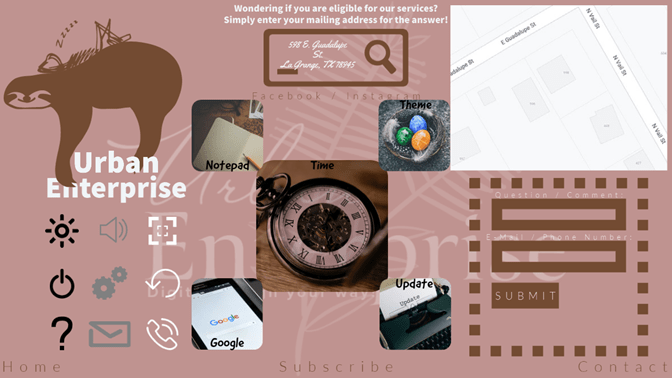
While the changes of this over-all project may have been more extensive than I predicted, I am happy with the final result. It all goes back to a saying I was told years ago, “No matter the size, a change is a change.” I kept my focus on the prototypes because I felt that was the area that needed the most work. When the initial prototypes were designed, I was thinking on a zoomed – in basis, however after I took some time to digest structured feedback and looked at various samples, I realized I was thinking about a user interface for this particular project the wrong way. So, I decided to remake the design using my phone’s home screen as a guide.
Trending technologies in media transformation
Each year media trends change, and the media trends that remain dominant within society have changes and updates within them. Throughout my research, I found a list of four trending changes that are common among almost all types of media including mobile media: VR/AR, device – specific content, voice / chat capabilities, and interactivity.
VR/AR
This function enhances a user’s experience, usually by making the content 3 – D. A few facilities that have embraced this technology include electronic departments / stores, movie theatres, and graphic design companies / individuals.
Device – Specific Content
There are several, solid examples that come to mind when I think of anything being device – specific. A few companies that carry the same content from one device to the next include Netflix, Hulu, Discovery +, Pandora, Disney +, and more!
Voice & Chat
Skype, Facetime, MSN, Zoom, and Remind are all examples of applications that have embraced voice and chat capabilities in recent years, and will only perform better in years to come!
Interactivity
Interaction within applications has been one of our main points of study throughout the progression of this course and is vital in everyday life. It has changed the way we look at and utilize media since I was a child from simple buttons to complex websites.
changing social media through technology
Social media is updated and changed on a regular basis by means of technology. The diverse ways combined with the speed of the changes have made social media remarkable to say the least, and while some would say it is a drain on society I can very much beg to differ! Below is a detailed list of technologies that have impacted and continue to impact social media every day!
Artificial Intelligence
AI has been used in the creation of automated marketing through social media.
VR/AR
Virtual and Augmented reality has been called the futuristic technology of today!
Bots & the Like
Bots are being used more and more to enhance communication between business and buyer!
References
- Editor. (2019, October 18). Functional and nonfunctional requirements: Specification and types. Retrieved May 18, 2021, from https://www.altexsoft.com/blog/business/functional-and-non-functional-requirements-specification-and-types/
- Interactive system design in human computer INTERFACE tutorial 18 May 2021 – Learn interactive system design in human computer INTERFACE Tutorial (25596): WISDOM Jobs India. (n.d.). Retrieved May 18, 2021, from https://www.wisdomjobs.com/e-university/human-computer-interface-tutorial-2374/interactive-system-design-25596.html
- Isakova, T. (2020, September 23). What are technical specifications and why to have them for your project. Retrieved May 18, 2021, from https://theappsolutions.com/blog/development/reasons-to-have-technical-document/
- Ghanem, E., & Sundararaju, M. (2020, March 26). Four technologies that are transforming media and events. Capgemini Worldwide. https://www.capgemini.com/2020/03/four-technologies-that-are-transforming-media-and-events/ .

 A Mother's World