

Advanced Web Technologies Individual Project
Advanced Web Technologies / IT470
Written by Kristi Divin / 8-16-2021
Table of Contents
- Project Outline & Requirements
- Web 2.0 Strategies
- Web Portal Plan
- Collaboration Plan
- Social Networking Plan
- Search Engine Optimization Plan
- SEO Web Pages (In Zipped File)
- Data Aggregation Plan
- Mashup Plan
- Web Server Performance & Security
- Web 2.0 Implementation Plan Final Version
“Web 2.0 is the business revolution in the computer industry caused by the move to the Internet as platform, and an attempt to understand the rules for success on that new platform.”
-Tim O’ Reilly
“Technology is best when it brings people together.”
-Matt Mullenweg Founder, WordPress
WordPress is a social platform and blogging host that I have been passionate about for the last two years now, which is why I have chosen to utilize it for this research project. In addition to this, I am hoping that I will be able to learn the platform a bit more through finding out what it is capable of and where it is lacking.
While WordPress may not have physical products or locations, that I am aware of, there are certain levels of services that this host offers to all users including the ability to choose a domain or subdomain name, upgrading possibilities, customization of your websites, templates to help you get started, color schemes, and more!
After finally diving into the WordPress menu fully, I decided it would be the best to start investigating web 2.0 features and tools that it has yet to utilize and pick from the pool! If you look to the right side of this page you will see a quote that was stated by Tim O’Reilly; it was on the blog holding this quote that I found the features I later decided suitable for a host such as WordPress.
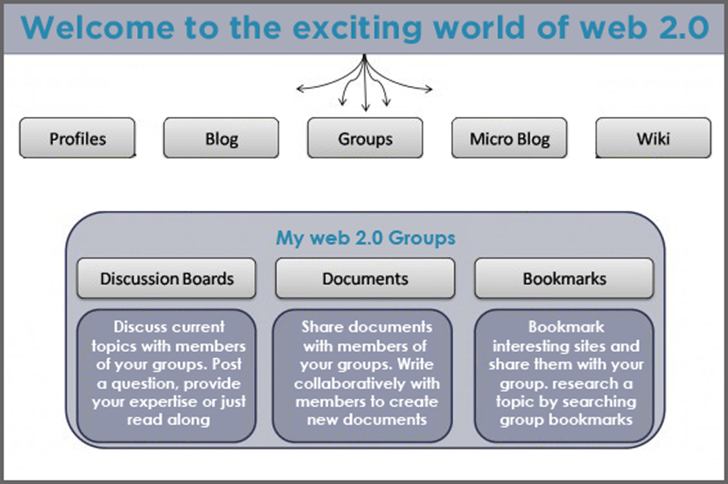
Figure 1.1 is a chart credited to a blog article written by Lipika in 2016, and this article is important to my research because it lists the basic web 2.0 tools that a web 2.0 technology or platform should contain to be labeled as such. Oddly enough, even with everything WordPress is already capable of, the top row of tools is missing to some degree of which I will explain within the next few paragraphs.
Common Web 2.0 Features & Tools
- Profiles—while the chances to upgrade, update, and customize your website are virtually endless, the option of building an individual profile is absent. To learn this is a bit discouraging for me, because blogging is all about a person’s passions in life.
- Blogging—this is the one area out of this group I would leave alone because platform is based on, the ability to blog, comment on blogs, and create sites for blogging.
- Groups—while you can view bloggers by the hundreds, I have not found an option to search for groups. So far the only thing that has come close this is the option to place blog entries under certain tags which then lets that entry appear in suggestion to similar bloggers.
- Micro Blogs—when I hear this term I think of blogs that would only go to a certain length, number of words, or possibly only to a certain amount of detail. From what I can tell, there is no such option available on WordPress.
- Wiki—There are a few different ways a company could go with this faction. I would like to see Wikipedia and WordPress collaborate a bit, whether that be when it comes to categorizing blogs or users or Wikipedia having a miniature glossary of related blog articles at the bottom of each new entry.
Benefits to the Additions
If nothing else, WordPress would gain many more capabilities from adding these few features or updating the ones already there that I may have not discovered yet! Just imagine a digital book club that gave users the option to go behind the scenes with every author who’s work they read at any given time; that scenario perfectly describes the benefits of adding each of the mentioned features.
WordPress Web Portal
Building an efficient web portal can be a tricky situation, no matter what the uses will be! Given this particular need and company, the web portal would have to be based on a blogger needs from upgrade capability to trendy website templates to useful and user-friendly plug-ins of all kinds! Keep reading for a specific list.
- Login form accommodated with the originating website.
- Desktop & mobile – friendly designs.
- Website’s dashboard that shows all active and non-active websites.
- Settings
- Camera
- New entry button that would lead to your entry dashboard.
- Audio, if applicable, for broadcasting live.
- Video, if applicable, for broadcasting live.
- Customer support/service.
- Help button for questions or bugs within the application.
COLLABORATION PLAN
Being that WordPress is basically a collaborator’s playground I had a bit of difficulty coming up with an efficient collaboration plan; that is until I started looking into the collaboration plugins that already exists, which is when I found two significant issues with WordPress collaboration. The first of which being the bloggers with a free WordPress plan have no access to collaboration tools at all! I do not find this fair because how does someone put a group of friends and family together for a family – centered blog if they have no collaboration tool to do so. Secondly, there are no Google collaboration tools in WordPress’s list of collaboration plugins. Google is one of the biggest platforms in the world from every angle and offers every type of tool a user can imagine, so it is silly that WordPress wouldn’t take advantage of that. With all this in mind, I decided it best to make a chart to show three common areas within WordPress in which free plans and Google Docs would benefit!
| Free WordPress Plan | Google Docs | |
| Efficiency | The dictionary definition is preventing wastes, whether that be land waste, wasting time, or wasting materials! When an account is not able to maximize the use of the host’s tools, time is being wasted in the creation of an elaborate blog I am sorry to say. However, if WordPress were to allow the free accounts a little use of the collaboration tools, even if only a free trial, then the users would be more likely to stay and possibly upgrade their plan later! | If WordPress were to embed a free plugin for Google Docs, the sky would be the limit for free plan users! They would be able to show off schoolwork, business presentations, individual documents, graphic designs, and so much more to friends and family. The best part is they would be able to do all of this through their WordPress blog! |
| User – Friendly | To open free plans up to free trials for different tools would make WordPress a lot more user – friendly, and in the long run, would likely mean more upgraded accounts! As it is right now, there is little to nothing users can do with collaboration aside from tagging the entries so other similar bloggers can see and comment on them. | Google Docs literally has user – friendly all over it! There are tours within the platform, instruction videos on YouTube, and contact information for a support team if a user has questions about how to use the application. The only thing Google to do to make this application more user – friendly is reaching out to social media platforms like WordPress and collaborating on plugins from one to the other and vice versa. |
| Traffic | Free WordPress would see huge traffic increases if they were allowed a little more freedom with the collaboration tools, because it would be much easier to share what they spend so much time working on. | WordPress would also see a traffic boost if they chose to implement Google Docs, because it would make collaboration a lot easier from WordPress to Facebook, Instagram, LinkedIn, Twitter, and more! |
Being that Google does not charge to provide services, and WordPress would be working with free accounts and free trials, this whole idea would literally cost nothing but time to implement! WordPress has been very well established for years, and do not need updates very often, so they do not have much to lose with considering this for a future update, at least in my opinion!
Impact of social networking
Social networking can be extremely beneficial to almost any business if used appropriately, unfortunately though, too many people utilize social networks and platforms with malicious intent! Generally speaking, there are a few major areas that social networking tends to impact the strongest when it comes to a business setting: businesses in general, web users that interact with them, IT support staff, and IT management.
- When dealing with an online – based businesses like WordPress, Flickr, Facebook, or Pinterest each platform is going to rely heavily on social networking because it is the platform users that make sure the business stays up and running through use of upgrades to the account which bring traffic to the company. However, if the platforms are used maliciously and the attackers are not exposed, then the company could be looking at severe, long – term recovery!
- The second most important factor in a business is the user that interacts with it, whether that be a customer or staff member. Social networking can impact either side of the screen positively or negatively. When staff members hack into a WordPress account from a company computer it makes the entire company look very suspicious, and they are usually investigated for a while after the incident. However, if social networks are used to advertise for the company in a positive light, more users are drawn in by word of mouth!
- Another factor that would be heavily impacted by social networking, usually the front lines of the impact, is the IT support team. If there is ever a technical complaint or issues with another WordPress user, the support team is going to hear about it first. However, they are also the ones that deal with recommendations, praise, and compliments. I guess one could say then that they deal with the best and worst of both worlds.
- Finally, there is the IT support management team, which is usually considered the backbone of the business. When the time comes that a support staff member can not deal with an irate customer, management steps in. When support staff does not know the answer to a given question, management steps in. On the lighter side of things though, they also grant promotional raises, raises in company positions, and transferal recommendations when needed!
Social Networking Benefits
Highlighted above, you see 3 terms that are well – known within the business world: recommendations, word – of – mouth, and traffic! These three terms are huge benefits that stem from social networking, because it is the word – of – mouth recommendations that bring traffic, in large part, to both online and physical – based businesses of any given type.
Potential issues
The biggest potential issue I can think of, especially for an online business, is a security breech. Usually this takes place when hackers find their way into company computers and steal the credentials of customers, staff members, or management! This is super dangerous because if the gathered information ends up in the wrong hands, the victim may end up in a world of trauma! Other potential issues may be theft of credit card information, social security numbers, bank information, company information, and much more!
SEARCH ENGINE OPTIMIZATION PLAN
When planning for SEO, it is important to really think about what type of company it is that you are working with, for example WordPress was designed for bloggers and marketing. You can create online stores and blogs of just about anything your heart desires, but you have to make the theme blend so that it is not off putting to anyone that visits your sight! With that said, there are three main SEO tactics that I love to use when it comes to blogging: support content, social media marketing, and entry tags for reaching out to similar bloggers. Out of the 3 SEO tools mentioned here, it’s nearly impossible to say which one works best since all three operate best when they are used together! All three of these tactics when used in a bundle make a very powerful marketing strategy and are guaranteed to bring more traffic, increase customer loyalty, and will likely have the customers stopping in regularly for purchases as well!
WEB CONTENT ACCESSIBILITY GUIDELINES (WCAG)
WCAG is a legal requirement for each webpage or website designed, and one that I can see that would be easily overlooked. However, it’s a legal practice to follow and consists of four base factions: perceivable, operable, understandable, and robust. According to W3Schools, each of these factions have their own little checklists that websites must follow for everything to run smoothly, look at the chart below for further information.
| Perceivable | Operable | Understandable | Robust | |
| Non – text entities must have text alternatives provided! | Keyboards should be capable of all functionalities. | Content must be readable and easy to understand. | Maximize compatibility! | |
| Provide alternatives for timed media, such as simple photos. | Make sure enough time is allotted for users to view and read content. | Webpages must appear and operate in predictable ways. | ||
| Include content that can be displayed in different ways. | Be aware of possible seizures when designing content. | Help visitors avoid / correct any mistakes and errors. | ||
| Separate foreground and background to increase visibility and sound. | Design for easy navigation and finding content. |
DATA AGGREGATION PLAN
By definition, aggregate data refers to high – level data acquired by combining individual – level data. “For instance, the output of an industry is an aggregate of the firms’ individual outputs within that industry. Aggregate data are applied in statistics, data warehouses, and in economics.” (Wikipedia, 2021)
There are various types of aggregate data you may see within a business, and honestly it is a little overwhelming, so I decided to go with data types I am already familiar with.
- SQL – While it may not always be the easiest data type to work with, SQL is considered aggregate data because it is individual pieces of information, and it serves as its own database most of the time.
Aggregate SQL Sample
- Microsoft Excel – Although similar in appearance, SQL tends to be more numerical, while Excel often has non-numerical characters that come into play such as names, addresses, colors, shapes, and so on. Still, because of the individualized nature it is considered aggregate data.
Aggregate Excel Sample
- A common, aggregate variable used today is Sum which is generally found in spreadsheets and is usually seen to be numerical as well. The picture below shows a subtotal sum for different units in a spreadsheet.
Aggregate Sum Sample
- Dates are also types of aggregate data, and as with the others it is the simplistic nature that classifies it as such. Below is a visual that demonstrates how to sum values between two dates.
With investigating each data type I discovered one vital use for all of them when thinking on a website such as WordPress, which is tracking. These four types of aggregate data could be used to track just about anything a user would need, from site visitors to post clicks, and comment quantity to entry dates! Another common factor among the four data types is a spreadsheet being used to display the data. Displaying a spreadsheet is one of the easiest tasks in web development because there are so many ways to go about it, but the fastest and most efficient way I have found is creating a Microsoft Excel document, taking a screenshot, and displaying it as an image within the webpage!
MASHUP PLAN
The mashup plan I decided to go with is a script designed with Python. Python is an older scripting language still used today, and I find it a lot less overwhelming than Java or JavaScript. The sample you will see in the zip file, when ran, produces a sum of the x and y variables. What I love about python though, is you are able to stretch, customize, and expand it nearly anyway that fits your vision and there are hundreds of different variables, characters, and formulas you can use!
Security & Optimization
I have always kept two rules close when it comes to securing and optimizing anything digital! Rule number one is keeping security up to date by all means necessary! The second rule is to use a third party that you know well and trust to do so. Since 2018, there are two companies I have utilized more often than pretty much all others, and they are Microsoft and Google; both of which have tight security plugins if you feel it is needed.
The main component of security when considering Microsoft is top – of – the – line antiviral protection. The software is known as Microsoft Security Essentials and has been around and in use almost as long as Microsoft has. However, as far as optimization is concerned, there is a popular application among Microsoft users even though it isn’t directly led by Microsoft which is called SentryOne. SentryOne has capabilities to track and optimize the performance of multiple database applications, which is what makes it such an asset to users and business owners.
While Google may have the upper hand with security and optimization features, it is Microsoft I put more trust in, because it seems to suit my needs a little better and is updated a bit more frequently!

 A Mother's World